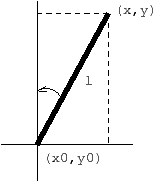
Consider the problem of balancing an inverted pendulum with the hand (through a mouse). The inverted pendulum has a length l, its bottom has coordinates x0 and y0 which are continuously controlled by the user and it forms an angle θ with the vertical. This pendulum is submitted to the following law:
|
We suppose that some auxiliary scalar functions have been defined
in a Objective Caml module Draw with implementation draw.ml and
interface draw.mli. A pendulum is characterized by its
bottom and top coordinates. The exported values are defined below:
  (* file draw.mli *)
  type pendulum
  val make_pend : float -> float -> float -> float -> pendulum
  val clear_pend : pendulum -> unit
  val draw_pend : pendulum -> unit
  val mouse_pos : unit -> float * float
We start by defining a synchronous module for integrating and deriving a signal.
  (* file misc.ls *)
  (* rectangle integration *)
  let node integr t dx = let rec x = 0.0 -> t *. dx +. pre x in x

  (* derivative *)
  let node deriv t x = 0.0 -> (x -.(pre x))/. t
Now, the main module defines global constants and the pendulum law.
  (* file pendulum.ls *)
  open Draw
  open Misc

  let static t = 0.05 (* sampling frequency *)
  let static l = 10.0 (* length of the pendulum *)
  let static g = 9.81 (* acceleration *)

  let node integr dx = Misc.integr t dx
  let node deriv x = Misc.deriv t x

  (* the equation of the pendulum *)
  let node equation d2x0 d2y0 = theta
  where
    rec theta =
        let thetap = 0.0 fby theta
        in integr (integr ((sin thetap) *. (d2y0 +. g)
                          -.(cos thetap) *. d2x0) /. l)

  let node position x0 y0 =
    let d2x0 = deriv (deriv x0)  in
    let d2y0 = deriv (deriv y0)  in

    let theta = equation d2x0 d2y0 in

    let x = x0 +. l *. (sin theta)  in
    let y = y0 +. l *. (cos theta)  in
    make_pend x0 y0 x y
As in Objective Caml, an open Module directive makes the names
exported by the module Module visible in the current
module 2. Imported values may be
either used with the dot notation (e.g, Draw.mouse_pos) or
directly (e.g, make_pend) once the module is opened.
Finally the main function continuously reads informations from the mouse, computes the position of pendulum, clear its previous position and draw its current position. We get:
  let node play () =
    let x0,y0 = mouse_pos () in
    let p = position x0 y0 in
    clear_pendulum (p fby p);
    draw_pendulum p;;
Now, all the files must be compiled. The compiler of Lucid Synchrone acts as a
preprocessor: the compilation of the implementation misc.ls
produces a file misc.ml and a compiled interface
misc.lci containing informations about types and clocks of the
implementation. Similarly, the compilation of the scalar interface
draw.mli produces a compiled interface draw.lci. Files
are compiled by typing:
  % lucyc draw.mli          => draw.lci
  % lucyc misc.ls           => misc.ml, misc.lci
  % lucyc pendulum.ls       => pendulum.ml
  % lucyc -s play -sampling 0.05 pendulum.lci

  % ocamlc draw.mli
  % ocamlc draw.ml
  % ocamlc pendulum.ml
  % ocamlc play.ml
  % ocamlc -o play draw.cmo pendulum.cmo play.cmo ...
The whole system is obtained by linking all the modules
(synchronous and scalars ones) and by sampling the main transition
function play on a timer (here, 0.05 seconds) giving the base
clock (the real-time clock) of the system.